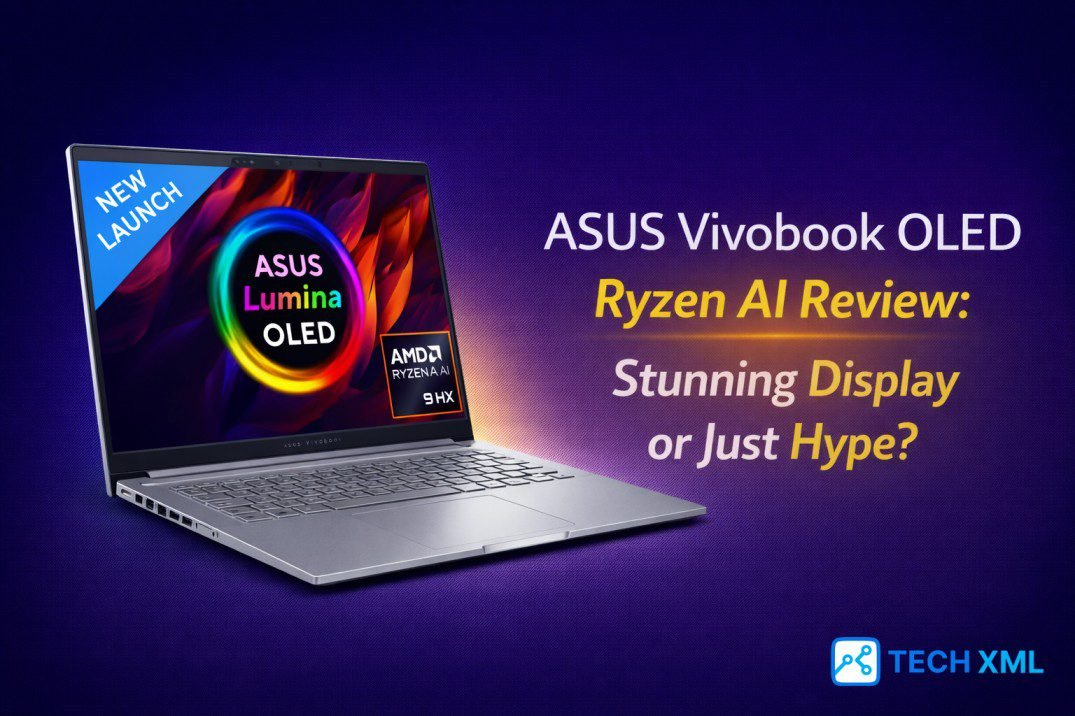
In 2026, almost every new laptop claims some level of artificial intelligence acceleration. However, very few brands clearly explain what that actually means for daily work. This ASUS Vivobook OLED Ryzen AI Review exists because that confusion feels real.
You see OLED branding, Ryzen AI promises, and aggressive pricing in one package. Naturally, the question becomes simple: is this innovation or just clever positioning? The market has matured quickly, yet expectations have grown even faster. Let us examine whether this machine earns its place in a serious buying shortlist.
- The Screen: Best-in-class OLED (Deep Blacks).
- The Brain: AMD Ryzen AI with dedicated NPU.
- The Reality: Perfect for creators, not for heavy gamers.
OLED and AI in the 2026 Laptop Landscape
Just three years ago, OLED displays remained limited to premium ultrabooks. Today, manufacturers bring OLED panels into mainstream segments. Consequently, buyers expect deeper contrast and accurate colors without flagship pricing.
At the same time, AMD expanded its neural processing capabilities. The AMD Ryzen AI processor specs now include dedicated NPU hardware for local AI tasks. This combination defines the new mid-range AI laptop 2026 category, blending performance, display quality, and power efficiency into thinner designs.
Design and Everyday Practicality
The Vivobook chassis feels purposeful rather than flashy. ASUS keeps the profile slim, yet the structure remains sturdy during normal use. As a thin and light productivity laptop, it stays easy to carry across campus or between meetings.
The hinge opens smoothly, and the keyboard offers satisfying travel. Over extended writing sessions, the experience feels controlled instead of cramped. The trackpad responds accurately, executing fundamentals well without dramatic styling.
Display Analysis: Substance Behind the OLED
The ASUS Vivobook OLED display quality forms the emotional center of this device. Colors appear vibrant without oversaturation, and black levels look genuinely deep. Streaming, photo editing, and even document work feel more immersive.
While harsh outdoor sunlight still challenges glossy panels, OLED laptop screen accuracy impresses in color-sensitive tasks. Skin tones look natural, and gradients transition smoothly.
You notice the difference during long editing sessions. Text appears crisp, and contrast reduces visual fatigue during late-night work. For creators and casual users alike, the OLED panel delivers genuine value rather than marketing shine.
Performance: Understanding Ryzen AI Laptop Performance
Under the hood, performance depends on a mix of CPU cores, integrated graphics, and a neural processing unit. The processor handles multitasking smoothly across productivity apps. Even with multiple browser tabs and video calls running, performance stays stable.
The neural engine accelerates background AI features such as noise cancellation and camera enhancements locally. This reduces cloud dependency and improves privacy. Thermals remain controlled under moderate loads, maintaining consistent speeds instead of short bursts followed by slowdowns.
Battery Life and Efficiency
Battery performance often separates hype from practicality. Fortunately, this machine performs reliably. On a typical workday, it lasts through several productive hours, benefiting from both OLED power management and the processor’s architecture.
Charging speeds feel competitive within this segment. A short top-up during lunch provides enough power for afternoon sessions, offering real-world flexibility.
Real World Usage: A Day with the Vivobook
Imagine a freelance consultant starting the morning with email and research. The laptop boots quickly, and spreadsheets appear sharp on the OLED panel. During virtual meetings, AI-powered computing enhances voice clarity and webcam lighting.
Later, light video edits export smoothly. The system remains responsive, and fan noise stays controlled. By evening, the battery still holds enough charge for entertainment, highlighting a machine that supports varied routines.
Success Story: From Doubt to Daily Driver
Rohit, a content strategist in Pune, hesitated before switching from an older ultrabook. He worried AI features were just gimmicks. However, after two weeks, he noticed improved multitasking stability and sharper visual output.
The OLED panel reduced eye strain, and local AI enhancements improved client calls. Eventually, the device became his primary work machine, proving that practical improvements create lasting value.
User Reviews
Neha, Delhi
“Balanced and dependable. The OLED screen makes streaming and academic projects look amazing.”
Arjun, Bengaluru
“Stable performance for client presentations. Gamers should look elsewhere, but for work, it’s perfect.”
Simran, Chandigarh
“Great for travel. It’s lightweight, and the battery lasts long enough for my flights.”
Forum Discussions
Aman, Mumbai asks:
“Can it compete with Intel ultrabooks?”
Community Reply:
“For creative work, yes. The OLED screen gives it an edge, and Ryzen AI keeps up in multitasking.”
Frequently Asked Questions
Is it good for content creation?
Yes, especially for photo editing and light video work due to the color-accurate OLED panel.
Does Ryzen AI make a difference?
It’s subtle but useful. It improves video call quality and background efficiency without slowing down the PC.
Is OLED burn-in a risk?
Modern panels have protection features. With normal mixed usage, durability is solid.
Is it good for students?
Absolutely. It balances portability, a great screen, and enough power for research and assignments.
Final Verdict
After examining design, display, performance, and battery life, the answer feels measured rather than dramatic. The ASUS Vivobook OLED Ryzen AI Review reveals a device that delivers meaningful balance. It does not revolutionize computing, yet it reflects the practical evolution of AI in mainstream laptops. For many users, this machine represents substance rather than hype.



Leave a Reply