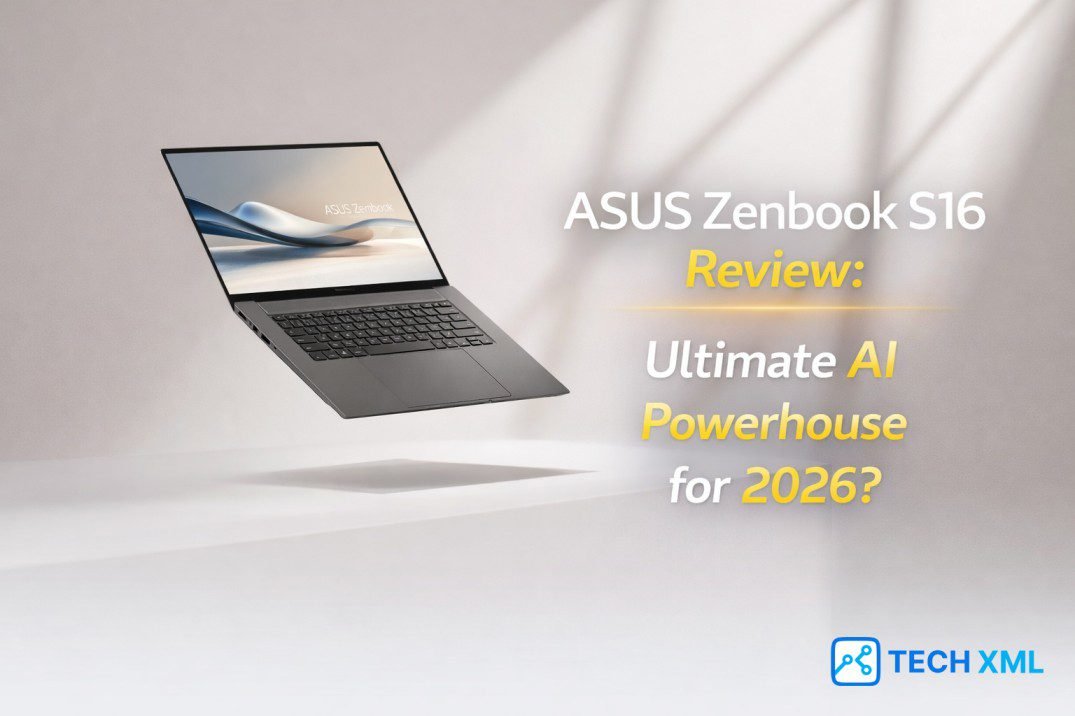
AI laptops no longer feel experimental in 2026. Major chipmakers now build dedicated neural engines directly into consumer machines, and Windows integrates AI features at the system level. As a result, buyers expect more than speed. They expect intelligence that improves daily work. This ASUS Zenbook S16 Review approaches that expectation with caution. Instead of repeating performance claims, we examine how this laptop fits real workflows. In a market full of AI labels, clarity matters more than excitement.
- The Brain: AMD Ryzen AI 9 Processor (NPU-driven).
- The Beauty: Stunning 3K OLED Touch Display.
- The Build: Ultra-thin “Ceraluminum” chassis.
The AI PC Shift and Why It Matters
The AI laptop 2026 wave did not happen overnight. Processor manufacturers redesigned silicon to handle machine learning tasks locally, which reduced cloud dependence. Consequently, privacy and responsiveness improved at the same time.
The inclusion of an AMD Ryzen AI processor reflects this shift. Unlike older CPUs that treated AI tasks as side work, this new architecture prioritizes them. Therefore, tasks like image enhancement, transcription, and background blur run directly on-device without draining the main cores.
However, hardware alone does not define value. Integration with Windows AI PC features determines whether these gains feel meaningful. In that context, the Zenbook S16 attempts to balance power and usability rather than chase extreme numbers.
Design and Build: Refined, Not Flashy
The Zenbook S16 follows a restrained design language. Its chassis feels solid, yet it remains light enough for daily commuting. Moreover, ASUS avoids unnecessary ornamentation, which reinforces its professional focus.
The hinge operates smoothly and holds firm at multiple angles. While many premium thin laptop models sacrifice rigidity for slimness, this device maintains structural confidence. That balance immediately signals durability.
Port selection remains practical instead of minimalistic. You get modern connectivity without carrying extra adapters, which improves everyday productivity. As a result, the machine feels built for work rather than showroom display.
ASUS Zenbook S16 OLED Display in Daily Use
The ASUS Zenbook S16 OLED display stands out as one of its strongest assets. Colors appear rich without oversaturation, and contrast levels enhance both editing and streaming. Consequently, creators benefit from more accurate previews.
Brightness levels handle indoor and moderately bright environments well. Text clarity also remains sharp during long writing sessions, which reduces eye fatigue. Therefore, this panel supports extended productivity instead of distracting from it.
Color consistency across angles remains stable, which matters during collaborative reviews. When multiple people view the screen, tonal shifts stay minimal. That reliability builds trust for professional tasks.
Performance Deep Dive: AI Meets Real Work
Raw numbers matter less than sustained performance. The ASUS Zenbook S16 AI performance profile shows strong multitasking capability across productivity and creative applications. Additionally, the AMD Ryzen AI processor handles background AI tasks without stuttering the main workflow.
Opening dozens of browser tabs alongside video editing software rarely causes slowdowns. While extreme 3D rendering still benefits from larger machines, everyday creative workloads feel fluid. Consequently, this device suits editors, writers, and analysts perfectly.
AI-powered features such as live captions and on-device summarization operate seamlessly. Because the neural engine manages these tasks efficiently, the system avoids excessive fan noise. That quiet behavior reinforces its professional appeal. Thermal control also deserves mention; even under prolonged loads, heat distribution remains controlled across the chassis.
Battery and Efficiency in Practice
Zenbook S16 battery life aligns well with its AI ambitions. During mixed workloads involving browsing, document editing, and light media work, it comfortably crosses a full workday. As a result, users rely less on constant charging.
Heavy creative sessions reduce endurance, yet efficiency remains respectable for its class. The optimized architecture ensures AI features do not aggressively drain power. Therefore, next-generation AI computing feels sustainable rather than experimental.
Charging speeds also help during tight schedules. Short top-ups provide meaningful hours of use, which supports mobile professionals. That practicality strengthens its position as a creator-focused laptop.
A Day in Real Work
Imagine a content editor starting the day with research and writing. The laptop runs multiple tabs, cloud documents, and video references without hesitation. Meanwhile, AI-based transcription tools convert interviews locally, preserving privacy.
By afternoon, light color correction and short video exports test its limits. Although it does not replace heavy studio machines, performance remains consistent. Consequently, turnaround time improves for mid-sized projects.
Evening travel highlights portability. The slim form fits easily into a backpack, and battery reserves handle late revisions. In real scenarios, intelligence supports workflow quietly instead of demanding attention.
Success Story: From MacBook to Zenbook
Raghav, a freelance editor from Pune, relied on a competing ecosystem for years. However, increasing AI requirements pushed him to explore Windows AI PC options. After switching, he noticed faster on-device transcription and smoother multitasking.
He reduced project preparation time significantly because AI tools ran locally. Although he initially hesitated about platform change, the workflow gains justified the move. His experience reflects how hardware evolution influences creative habits.
What Users Say
Ananya, Bengaluru
“The OLED panel improves color grading accuracy without external calibration. I trust it for client previews completely.”
Vikram, Delhi
“I travel frequently for consulting. The lightweight design reduces strain, and the battery allows uninterrupted presentations.”
Sara, Mumbai
“Live captioning and summarization are reliable during research-heavy tasks. My documentation process feels much more efficient.”
Forum Discussions
Arjun, Hyderabad asks:
“Do AI features justify upgrading in 2026?”
Community Reply:
“For professionals using transcription or image processing, yes. Local processing boosts speed and privacy noticeably.”
Megha, Chandigarh asks:
“Is the new AI chip reliable long-term?”
Community Reply:
“Thermal stability and firmware updates appear mature this cycle. Established manufacturers reduce uncertainty compared to experimental startups.”
Frequently Asked Questions
Is it good for professional video editing?
It handles moderate editing efficiently, especially short-form content. Heavy cinematic workflows still benefit from larger workstations with discrete graphics.
Does AI improve daily productivity?
Yes, especially for transcription and background processing. The NPU manages these locally, making performance smoother.
How reliable is the battery?
Under mixed productivity use, it supports a full working day. Intense creative sessions reduce endurance, but quick charging helps.
Will this laptop remain relevant?
Yes. Given its modern NPU architecture and Windows AI integration, it is future-ready for evolving AI features.
Final Verdict
This ASUS Zenbook S16 Review confirms one clear point: AI capability in 2026 means practical workflow improvement, not abstract marketing claims. The device combines thoughtful design, strong ASUS Zenbook S16 AI performance, and reliable battery life.
While it does not replace high-end studio rigs, it covers most professional scenarios with confidence. Consequently, it stands as a credible option in the AI laptop 2026 landscape. For readers seeking balance between intelligence, portability, and performance, it earns serious consideration.



Leave a Reply